Running partition jobs on Amazon EC2 Clusters
Once the distributed processing is completed, users can start the partition jobs. This tutorial will provide instructions on how to setup an EC2 cluster and start GSPartition jobs on it.
Create a GraphStorm Cluster
Setup instances of a cluster
A cluster contains several instances, each of which runs a GraphStorm Docker container. Before creating a cluster, we recommend to follow the Environment Setup. The guide shows how to build GraphStorm Docker images, and use a Docker container registry, e.g. AWS ECR , to upload the GraphStorm image to an ECR repository, pull it on the instances in the cluster, and finally start the image as a container.
Note
If you are planning to use parmetis algorithm, please prepare your docker image using the following instructions:
git clone https://github.com/awslabs/graphstorm.git

cd /path-to-graphstorm/docker/

bash /path-to-graphstorm/docker/build_docker_parmetis.sh /path-to-graphstorm/ image-name image-tag
There are three positional arguments for build_docker_parmetis.sh:
path-to-graphstorm (required), is the absolute path of the “graphstorm” folder, where you cloned the GraphStorm source code. For example, the path could be
/code/graphstorm.image-name (optional), is the assigned name of the Docker image to be built . Default is
graphstorm.image-tag (optional), is the assigned tag prefix of the Docker image. Default is
local.
Run a GraphStorm container
In each instance, use the following command to start a GraphStorm Docker container and run it as a backend daemon on cpu.
docker run -v /path_to_data/:/data \
                  -v /dev/shm:/dev/shm \
                  --network=host \
                  -d --name test graphstorm:local-cpu service ssh restart
This command mounts the shared /path_to_data/ folder to a container’s /data/ folder by which GraphStorm codes can access graph data and save the partition result.
Setup the IP Address File and Check Port Status
Collect the IP address list
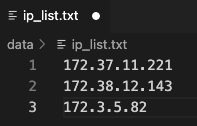
The GraphStorm Docker containers use SSH on port 2222 to communicate with each other. Users need to collect all IP addresses of all the instances and put them into a text file, e.g., /data/ip_list.txt, which is like:
Note
We recommend to use private IP addresses on AWS EC2 cluster to avoid any possible port constraints.
Put the IP list file into container’s /data/ folder.
Check port
The GraphStorm Docker container uses port 2222 to ssh to containers running on other machines without password. Please make sure the port is not used by other processes.
Users also need to make sure the port 2222 is open for ssh commands.
Pick one instance and run the following command to connect to the GraphStorm Docker container.
docker container exec -it test /bin/bash
Users need to exchange the ssh key from each of GraphStorm Docker container to
the rest containers in the cluster: copy the keys from the /root/.ssh/id_rsa.pub from one container to /root/.ssh/authorized_keys in containers on all other containers.
In the container environment, users can check the connectivity with the command ssh <ip-in-the-cluster> -o StrictHostKeyChecking=no -p 2222. Please replace the <ip-in-the-cluster> with the real IP address from the ip_list.txt file above, e.g.,
ssh 172.38.12.143 -o StrictHostKeyChecking=no -p 2222
If successful, you should login to the container with ip 172.38.12.143.
If not, please make sure there is no restriction of exposing port 2222.
Launch GSPartition Jobs
Now we can ssh into the leader node of the EC2 cluster, and start GSPartition process with the following command:
python3 -m graphstorm.gpartition.dist_partition_graph
    --input-path ${LOCAL_INPUT_DATAPATH} \
    --metadata-filename ${METADATA_FILE} \
    --output-path ${LOCAL_OUTPUT_DATAPATH} \
    --num-parts ${NUM_PARTITIONS} \
    --partition-algorithm ${ALGORITHM} \
    --ip-config ${IP_CONFIG}
Warning
Please make sure the both
LOCAL_INPUT_DATAPATHandLOCAL_OUTPUT_DATAPATHare located on the shared filesystem.The number of instances in the cluster should be equal to
NUM_PARTITIONS.For users who only want to generate partition assignments instead of the partitioned DGL graph, please add
--partition-assignment-onlyflag.
Currently we support both random and parmetis as the partitioning algorithm for EC2 clusters.