Use GraphStorm in a Distributed Cluster
GraphStorm can scale to the enterprise-level graphs in the distributed mode by using a cluster of instances. To leverage this capacity, there are four steps to follow:
Create a cluster with instances each of which can run GraphStorm Docker container.
Set up the IP address file and check port 2222 status.
Partition large graphs into distributed format.
Launch the training command within one instance’ container.
The first section of this tutorial uses the OGB-MAG as an example data to demonstrate how to use GraphStorm to train an RGCN model (a built-in model) in a cluster with three EC2 instances. The OGB-MAG data is large enough to demonstrate the scalability of GraphStorm, and also small enough to complete training in short time.
Create a GraphStorm Cluster
Setup the instance of a cluster
A cluster contains several instances each of which can run GraphStorm Docker container.
To create such a cluster, in one instance, please follow the Environment Setup description to setup GraphStorm Docker container environment, and use a Docker management system, e.g., AWS ECR, to upload the Docker image built in the instance to a Docker repository and pull it to the rest of the instances in the cluster.
If there is no such Docker manangement system available in your environment, in each instance of the cluster, follow the Environment Setup description to build a GraphStorm Docker image, and start the image as a container. Then exchange the ssh key from inside of one GraphStorm Docker containers to the rest containers in the cluster, i.e., copy the keys from the /root/.ssh/id_rsa.pub from one container to /root/.ssh/authorized_keys in containers on all other containers.
Create GraphStorm container by mounting the NFS folder
In each instance, use the following command to start a GraphStorm Docker container and run it as a backend daemon.
nvidia-docker run -v /path_to_data/:/data \
                  -v /dev/shm:/dev/shm \
                  --network=host \
                  -d --name test graphstorm:local
This command mount the shared /path_to_data/ folder to each container’s /data/ folder by which GraphStorm codes can access graph data and save training and inference outcomes.
Setup the IP address file and check port status
Collect the IP list
The GraphStorm Docker containers use SSH on port 2222 to communicate with each other. Users need to collect all IP addresses of the three instances and put them into a text file, e.g., /data/ip_list.txt, which is like:
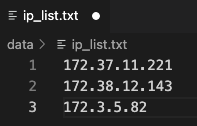
Note
If possible, use private IP addresses, insteand of public IP addresses. Public IP addresses may have additional port constraints, which cause communication issues.
Put this file into container’s /data/ folder.
Check port
The GraphStorm Docker container uses port 2222 to ssh to containers running on other machines without passwords. Please make sure all host instances do not use this port.
Users also need to make sure the port 2222 is open for ssh commands.
Pick one instance and run the following command to connect to the GraphStorm Docker container.
docker container exec -it test /bin/bash
In the container environment, users can check the connectivity with the command ssh <ip-in-the-cluster> -o StrictHostKeyChecking=no -p 2222. Please replace the <ip-in-the-cluster> with the real IP address from the ip_list.txt file above, e.g.,
ssh 172.38.12.143 -o StrictHostKeyChecking=no -p 2222
If succeeds, you should login to the container in the <ip-in-the-cluster> instance.
If not, please make sure there is no restriction of exposing port 2222.
For distributed training, users also need to make sure ports under 65536 is open for DistDGL to use.
Partition a Graph
Note
All commands below should be run in a GraphStorm Docker container. Please refer to the GraphStorm Docker environment setup to prepare your environment.
Now we can download and process the OGBN-MAG data with the command below.
python3 /graphstorm/tools/gen_mag_dataset.py --savepath /data/ogbn-mag-lp/ --edge-pct 0.2
Because we use three GraphStorm instances in the cluster for model training, this command splits the MAG data into three partitions by specifying the --num-parts argument to 3.
python3 /graphstorm/tools/partition_graph_lp.py --dataset ogbn-mag \
                                                --filepath /data/ogbn-mag-lp/ \
                                                --num-parts 3 \
                                                --balance-train \
                                                --balance-edges \
                                                --num-trainers-per-machine 4 \
                                                --target-etypes author,writes,paper \
                                                --output /data/ogbn_mag_lp_3p
After this command completes successfully, the partitioned OGBN-MAG graph is stored in the /data/ogbn_mag_lp_3p folder whose structure is like the diagram below. Because the /data/ folder is a shared filesystem, all instances in the cluster can access these files.
/data/ogbn_mag_lp_3p
ogbn-mag.json
node_mapping.pt
edge_mapping.pt
|- part0
    edge_feat.dgl
    graph.dgl
    node_feat.dgl
|- part1
    edge_feat.dgl
    graph.dgl
    node_feat.dgl
|- part2
    edge_feat.dgl
    graph.dgl
    node_feat.dgl
Note
The two mapping files, node_mapping.pt and edge_mapping.pt, are used to record the mapping between the ogriginal node and edge ids in the raw data files and the ids of nodes and edges in the constructed graph. They are important for mapping the training and inference outputs. Therefore, DO NOT move or delete them.
Launch Training on One Container
When graph partition data is ready, it is easy to launch a distributed training job. Pick a GraphStorm container, e.g. the container with IP address 172.37.11.221, and run the following command.
python3 -m graphstorm.run.gs_link_prediction \
           --workspace /data/ogbn-mag-lp/ \
           --num-trainers 4 \
           --num-servers 1 \
           --num-samplers 0 \
           --part-config /data/ogbn_mag_lp_3p/ogbn-mag.json \
           --ip-config /data/ip_list.txt \
           --ssh-port 2222 \
           --cf /graphstorm/training_scripts/gsgnn_lp/mag_lp.yaml \
           --node-feat-name paper:feat \
           --save-model-path /data/ogbn-mag-lp/models/
That’s it! The command will initialize the training in all three GraphStorm containers, each of which will take a partition of the MAG graph and conduct link prediction traing collaborately.
Train a Large Graph (OGBN-Papers100M)
The previous sections demonstrates GraphStorm’s distributed capability for a quick start. This section will use GraphStorm to train a large Graph data, i.e., OGBN-Papers100M, that can hardly train an RGCN model on it in a single machine. The steps of training this large graph is nearly the same as the above section, and only need a few additional operations.
Create a GraphStorm Cluster
In addition to the three GraphStorm instance created in the OGBN-MAG tutorial, to download and partition the OGBN-Papers100M graph, we need a new instance that has large memory, e.g., >800GB. In this tutorial we use an AWS r6a.32xlarge instance, which has 1TB memory. For the instance, please follow the Environment Setup description to setup GraphStorm Docker container environment. Once building the GraphStorm Docker image in this instance, use the following command to start a GraphStorm Docker container.
docker run -v /path_to_data/:/data \
           -v /dev/shm:/dev/shm \
           --network=host \
           -d --name test graphstorm:local
Note
Use the “docker”, instead of “nvidia-docker” command to create the GraphStorm container because the new r6a.32xlarge instance does not have GPUs installed.
Make sure there is at least 300GB free space in the /path_to_data/ folder. It is better to use the shared file system folder so that the partitioned graph data can be easily shared to the GraphStorm cluster.
Process and Partition a Graph
Run the below command to download and partition the OGBN-Papers100M data for a node classification task, which will predict the category of a paper. Because the ogbn-papers100M is one of GraphStorm’s built-in datasets, we do not specify some arguments, such as target-ntype, nlabel-field, and ntask-type, which have been automatically handled by GraphStorm’s ogbn_datasets.py.
python3 /graphstorm/tools/partition_graph.py --dataset ogbn-papers100M \
                                            --filepath /data \
                                            --num-parts 3 \
                                            --train-pct 0.1 \
                                            --balance-train \
                                            --balance-edges \
                                            --output /data/ogbn_papers100M_3p \
Given the size of OGBN-Papers100M, the download and partition process could run more than 5 hours and consume around 700GB memory in peak. After the command completes, the partitioned OGBN-Papers100M graphs are stored in the /data/ogbn_papers100M_3p folder whose structure is the same as the OGBN-MAG’s.
Distribute Partitioned Graphs and Configurations to all Instances
In this step, users need to copy these partitioned files to the shared file system of the GraphStorm cluster. And the IP list file creation and 2222 port open operations are identical to the above OGBN-MAG section.
For the OGBN-Papers100M data, we use a YAML file, ogbn_papers100M_nc_p3.yaml, that has the contents below.
---
version: 1.0
gsf:
basic:
    model_encoder_type: rgcn
    backend: gloo
    verbose: false
    no_validation: false
    evaluation_frequency: 500
gnn:
    num_layers: 3
    hidden_size: 128
    mini_batch_infer: true
input:
    restore_model_path: null
output:
    save_model_path: null
    save_embed_path: null
hyperparam:
    dropout: 0.
    lr: 0.001
    num_epochs: 4
    fanout: "5,10,15"
    eval_fanout: "5,10,15"
    batch_size: 128
    eval_batch_size: 128
    wd_l2norm: 0
rgcn:
    num_bases: -1
    use_self_loop: true
    lp_decoder_type: dot_product
    sparse_optimizer-lr: 1e-2
    use_node_embeddings: false
node_classification:
    target_ntype: "node"
    label_field: "labels"
    num_classes: 172
Launch Training in One Container
Launch the training for the OGBN-Papers100M is similar as the OGBN-MAG data. Pick a GraphStorm container, e.g. the container with IP address 172.37.11.221, and run the following command.
python3 -m graphstorm.run.gs_node_classification \
           --workspace /data/ \
           --num-trainers 4 \
           --num-servers 1 \
           --num-samplers 0 \
           --part-config /data/ogbn_papers100M_3p/ogbn-papers100M.json \
           --ip-config /data/ip_list.txt \
           --ssh-port 2222 \
           --graph-format csc,coo \
           --cf /data/ogbn_papers100M_nc_p3.yaml \
           --node-feat-name feat
Due to the size of Papers100M graph, it will take around six minutes for all GraphStorm containers in the cluster to load corresponding partitions before the training starts.
Given a cluster with three AWS g4dn.12xlarge instances, each of which has 48 Intel Xeon vCPUs, four Nvidia T4 GPUs, and 192GB memory, it takes around 45 minutes to train one epoch with the given configurations.